DialUp 4 Less Internet Access
WebMail Access
 
Click Here To Verify Our BBB Status
 
  
Email Client Support/Setup for Opera 7.x
 
Configuring Opera 7.x
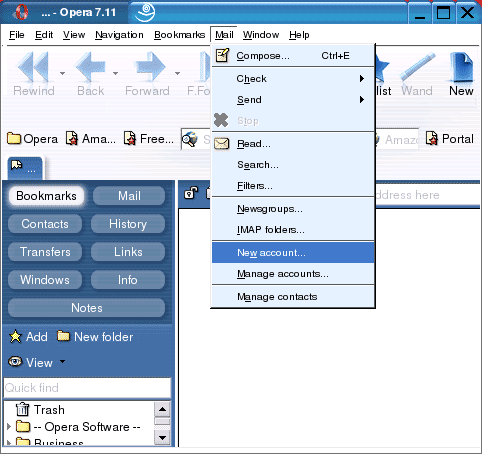
  • On the Toolbar, click Mail and select New account from the menu.
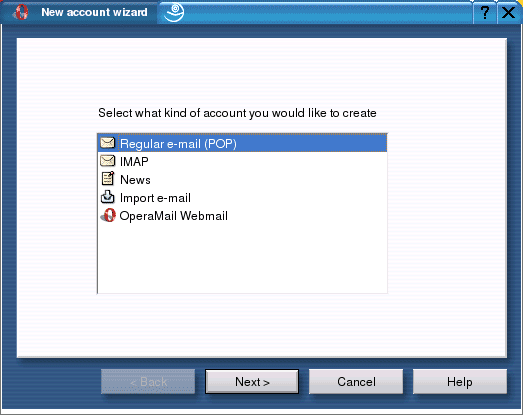
  • Select Regular e-mail (POP) from the list.
  • Click Next to continue.
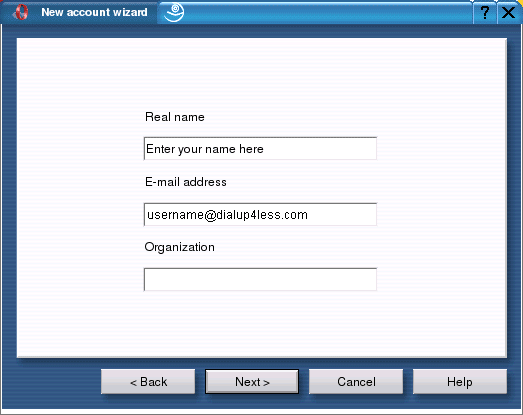
  • Real name = enter your name.
  • E-mail address = enter the e-mail address of the account.
  • Click Next to continue.
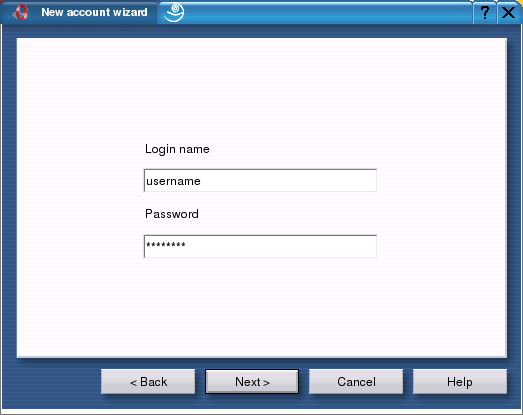
  • Login name = enter the username of the e-mail account.
  • Password = enter the e-mail account password.
  • Important: passwords are case-sensitive. Ensure the Caps Lock is disabled.
  • Click Next to continue.
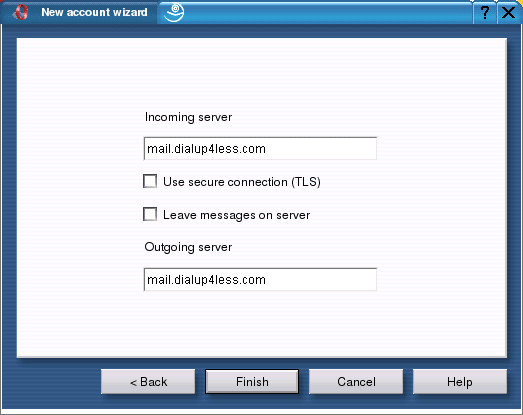
  • Incoming mail server = Follows this format: mail.dialup4less.com.
  • Replace the ispname.com with your ISP's info.
  • Outgoing mail server = Follows this format: mail.dialup4less.com. Replace the ispname.com with your ISP's info.
  • Important: you still need to enable SMTP authentication.
  • Click Finish to complete the wizard.


Back To Support Page
 Copyright © 1998-, Dialup 4 Less.